Know why your Mac
feels slow. Fix what matters.
A small one-time purchase. Every update free, forever.
Live graphs, a health score that explains itself, and storage labeled Safe, Review, or Don’t touch. Cleanup goes to the Trash first, so nothing is lost by accident. Built by a senior software engineer with 20+ years of experience shipping quality software.
Signed and notarized by Apple. Your key and installer arrive by email a minute after checkout.

The Your Mac window, captured on macOS
Features
One calm utility for the questions Activity Monitor leaves open.
Each tool shows its numbers and says why before it suggests anything. No Free RAM theater. No junk scare. External monitors: honest brightness status.
Right now, at a glance
CPU, memory, disk, network, and thermal state on one page, each with a big number and a live graph. GPU and battery cards appear when your Mac reports them. Graphs open with recent readings, not a blank chart.
Mac Health Score
One number for memory pressure, storage, battery, and thermal state. The reasoning is always shown, so you can check it.
Storage with a story
Big items show when you last used them and a label: Safe, Review, or Don’t touch. System Data, developer leftovers, and forgotten Downloads end in a decision.
Trash-first cleanup
You review first. Then items go to the Trash, with undo. Nothing is permanently deleted by default.
Network that names devices
Turn on LAN discovery and see names instead of bare IP addresses: Bonjour and SMB names, hostnames, vendors, and your own labels. It stays on your network.
My Mac feels slow
One plain answer: which app held memory, how much is in swap, which login items start at login. No Free RAM button, because it does not help.
A briefing you can send
Copy it, mail it, or save it as PDF, Word, or a .macrevealreport file you can open later. Useful when someone else helps with your Mac.
Private by design
No analytics, no telemetry, no account. File names, scans, and history stay in a local database on your Mac.
Duplicates you can trust
Compare side by side before you keep one. MacReveal never deletes anything in your Photos library.
Displays honesty
Hardware, software, or not supported. Never faked.
Each monitor is labeled in Hardware, Displays, so you know whether a brightness slider can really move the backlight.
Inside the app
The real app, not a mockup
Screenshots from a shipping MacReveal build. What you buy is what you see.
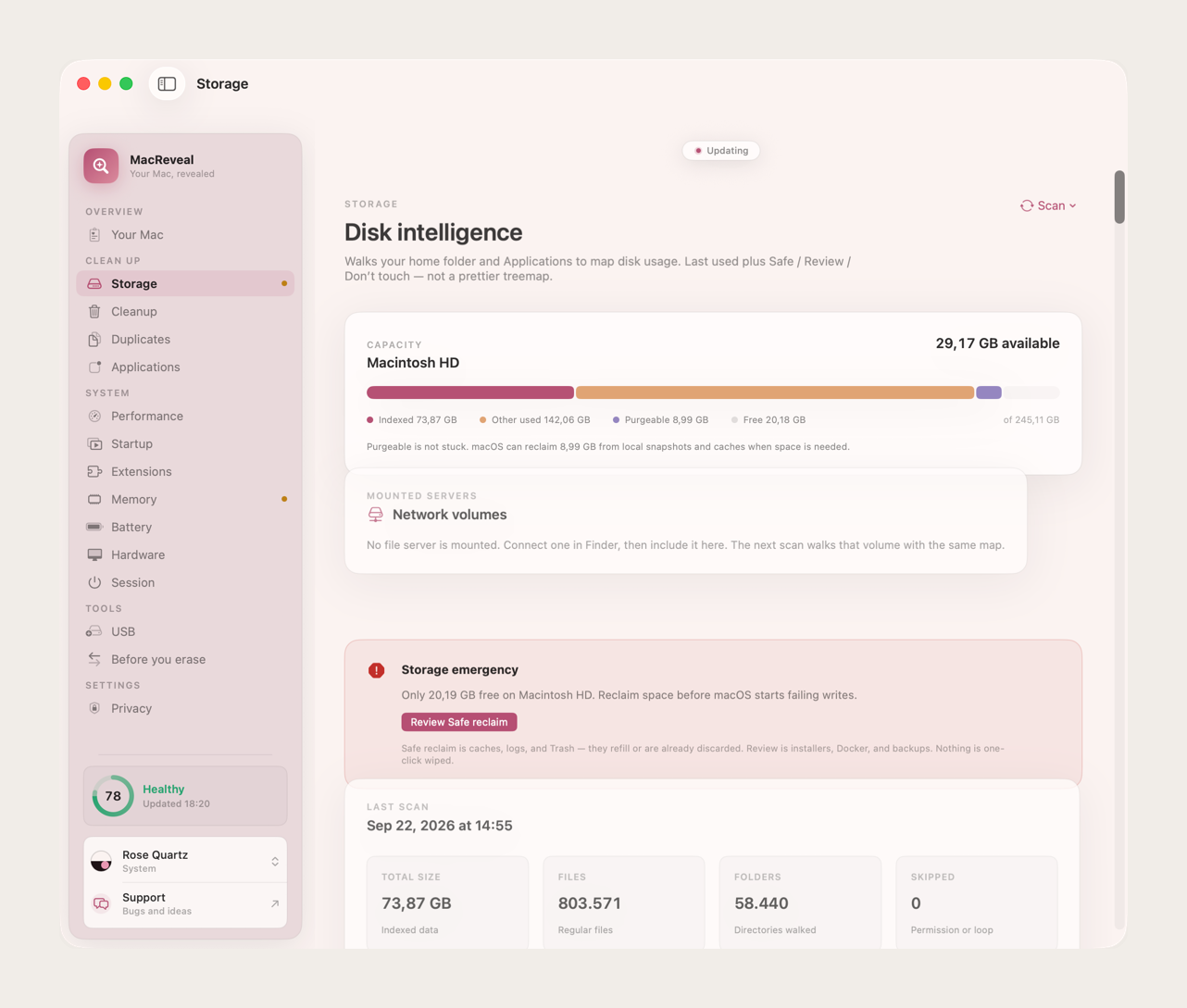
Storage
Find the real space wasters. Every item is Safe, Review, or Don’t touch before you act.
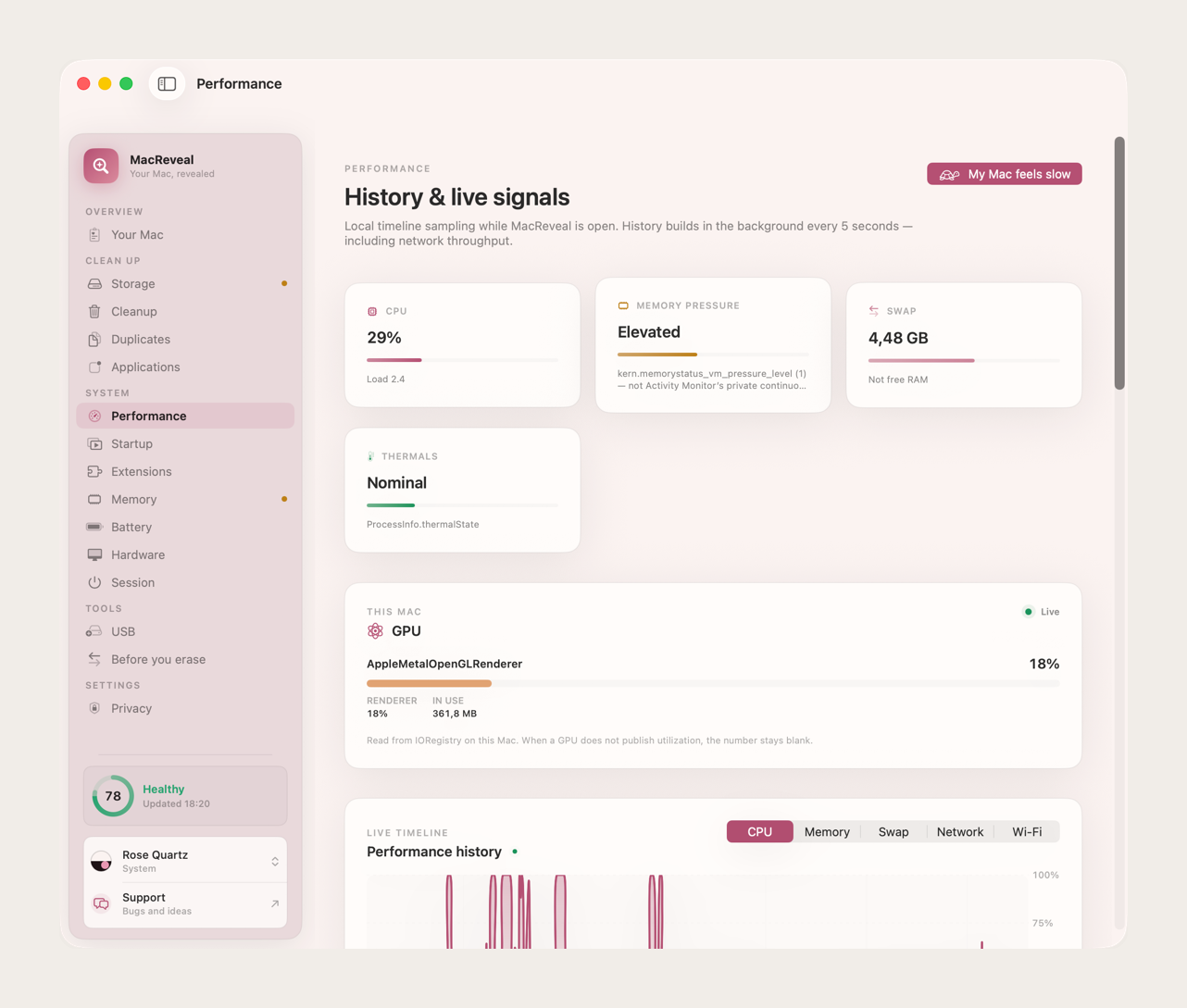
Performance
See which app held memory, how much is in swap, and how Wi‑Fi looked this week. Named LAN devices when you turn discovery on.
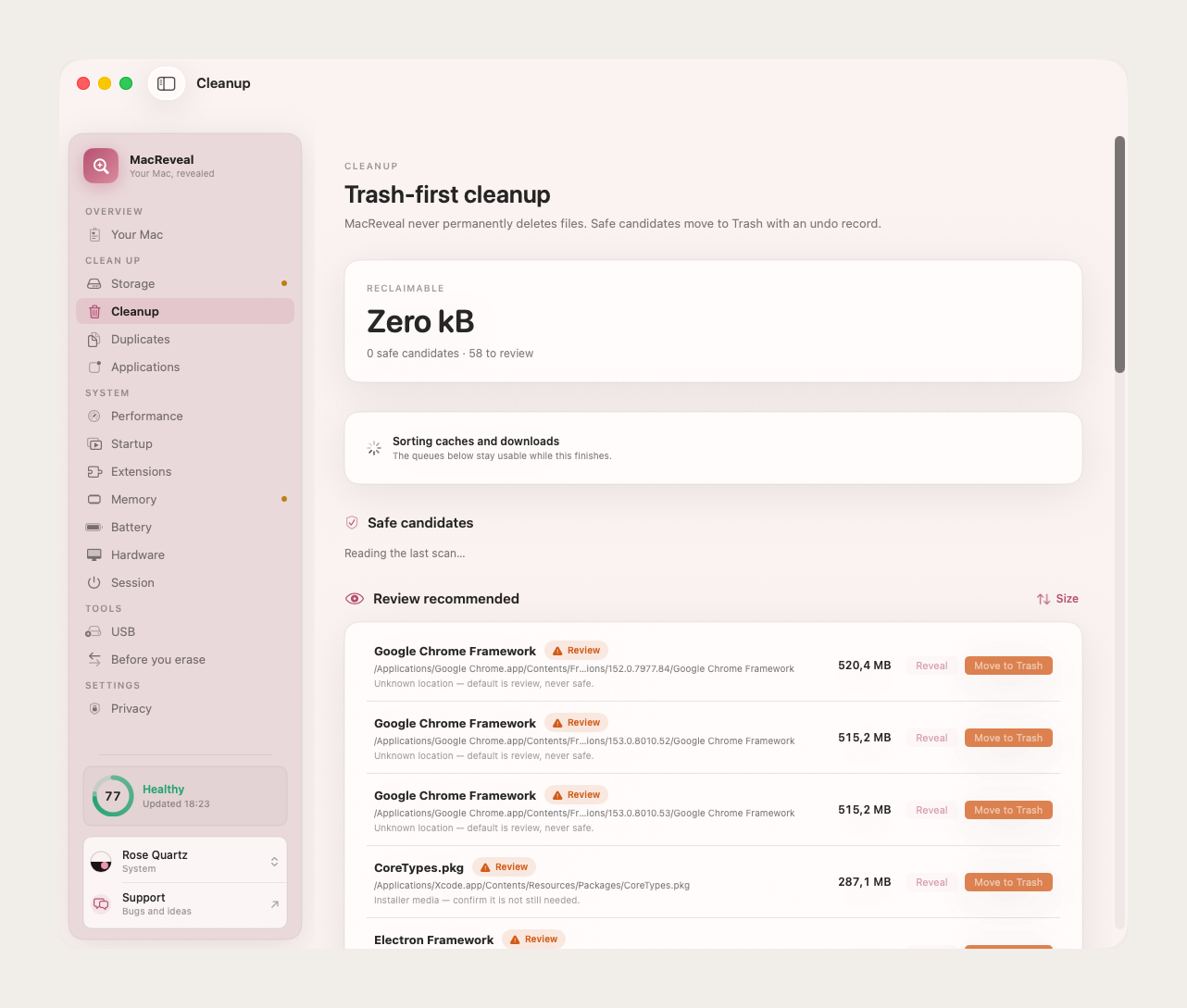
Cleanup
Review first. Everything goes to the Trash with undo. Nothing permanent unless you empty Trash yourself.
How it works
Open it once. Leave with a clear next step.
Diagnose, optionally grant Full Disk Access, then act only on what you approve.
Step 1: Diagnose
One button. MacReveal reads memory, storage, startup items, and hardware on this Mac, then shows a health score with the reasons behind it.
Step 2: Grant Full Disk Access, if you like
Optional. One switch in System Settings lets MacReveal see every folder so you are not asked folder by folder. Diagnose still works without it.
Step 3: Act only on what you approve
Each storage, duplicate, and uninstall suggestion says why. Everything goes to the Trash first and can be undone.
Privacy
Your file names never leave your Mac. That is the product.
No analytics, no account, no cloud that stores your scans. Maps and performance history live in a local database you can delete anytime. MacReveal goes online only to activate your license and check for updates. Network tests run only when you start them.
Read the privacy policyOn-device by default
File names, scores, and scan results are never uploaded.
You hold the data
It is all in local files you can inspect or delete.
Opt-in only
The speed test and LAN discovery run only when you turn them on.
Pricing
A small one-time cost. Free updates forever.
$9.99 once. That is less than an hour with a repair technician, and less than the AI tool and API bills it would take to build something like it yourself. No yearly renewal, ever.
I am a software engineer with 20+ years of experience building software that has to keep working. MacReveal is the tool I wanted for my own Macs: honest numbers, no scare tactics, nothing deleted behind your back. It is shaped by feedback from thousands of customers, and every improvement ships to everyone as a free update.
Yours to keep, with every update.
Tax is handled at checkout by Dodo Payments. Your key and the signed installer arrive by email a minute later.
- Live overview: CPU, memory, disk, and network
- Mac Health Score with reasons
- Storage treemap, forgotten files, and duplicates
- Trash-first cleanup with undo history
- Performance history and hardware checks
- Bootable installer wizard
- Every update, free forever
14-day refund if MacReveal is not useful on your Mac.
FAQ
Good questions before you buy
Price, privacy, free tools, building it yourself. Something else? Ask support.
Is this a subscription?+
No. MacReveal is $9.99 once, for one Mac. Every update is free, forever. After activation it works offline.
Why pay when free tools exist?+
Free tools are good at one job each. MacReveal puts live graphs, a health score with reasons, labeled storage, and cleanup you can undo in one calm app, for $9.99 once. No ads, no analytics, no upsell after you buy.
Why not build it myself with AI?+
You could try. Reading memory, storage, and hardware safely takes a lot of careful, tested code, and the AI tool and API bills alone would likely pass $9.99 long before it works well. MacReveal is already built, notarized by Apple, and maintained for you.
Will it be maintained?+
Yes. MacReveal is actively developed, and user feedback decides what improves next. Every update is free, forever, for everyone who bought it. Share your feedback.
Is this CleanMyMac?+
No. MacReveal never calls your files junk or infected. It has no Free RAM button and no battery “boost”. Cleanup goes to the Trash first, with undo.
Does it upload my file names or scan results?+
No. Scans, cleanup history, and performance samples stay in a local database on your Mac. MacReveal goes online to activate your license and to check for updates. The speed test and connection check run only when you start them.
Does it slow my Mac down?+
It is built not to. Live graphs read every two seconds, only while the Your Mac page is on screen. While the app is open, it saves one small reading every five seconds, so the graphs have history when you return.
Why not just use Activity Monitor?+
Use Activity Monitor when you need every process. MacReveal answers a different question: is this Mac healthy, what makes it feel slow, and what is safe to clean?
Is $9.99 worth it if I only use it a few times a year?+
Yes. One slow afternoon costs more than $9.99 of your time. Pay once, keep every update, and move the seat to a new Mac.
Does it work on a Mac mini, iMac, or Mac Studio?+
Yes. Battery cards appear only on Macs that have a battery. Everything else works the same. GPU numbers appear when macOS publishes them for your Mac.
What does it need?+
macOS 14 or later, on Apple silicon or Intel. Full Disk Access is optional. It unlocks complete storage analysis, and MacReveal still diagnoses your Mac without it.
Can I move my license to a new Mac?+
Yes. On the old Mac, go to Privacy → License and deactivate. Then activate the new Mac with the same key. How moving a license works.
Get MacReveal
Stop guessing why your Mac is slow.
$9.99 once, for one Mac, with every update free forever. Your key and installer arrive by email a minute after checkout.